Customer initiated flows are actions initiated by your backend servers and initiate an orchestration between your server application, your app and the TrustID ecosystem (SDK and service).
⚙️ Customer Initiated Processes
|
Process |
Description |
|---|---|
|
Provisioning |
This process activates the SDK and assigns a trustUserID to the user. It is performed only once as the first step for onboarding a user to TrustID. The process returns the assigned trustUserID. |
|
Authentication |
This process authenticates the user by TrustID. It returns the trustUserID of the authenticated user. |
|
Consent |
This process allows a user to digitally sign text you provide as proof of consent. It returns the trustUserID of the user, the signed text, and the user's public key for signature verification. |
|
Block a User |
This process de-activates the assigned trustUserID. It is usually performed when a user is terminated in your app and is irreversible. After a user is blocked, they cannot perform any more actions with TrustID. |
🔀 Provisioning, Authentication, and Consent Process Flows
To implement any of these flows, you will need to follow the sequence below:
-
From your backend servers, call the CIBA endpoint of eIdent and the CIBA protocol to start a new transaction, indicating what kind of transaction (provisioning, Authentication or Consent).
-
Extract the process identifier within the response (auth_req_id) and send it over to your app.
-
In your app, use the process identifier within the response (auth_req_id) to start the chosen transaction by invoking the appropriate SDK APIs.
-
Wait for the user to complete the process (alternatively, poll the server for updates).
-
From your backend servers, poll the token endpoint of the eIdent server with the process identifier (auth_req_id) to retrieve the ID token with the result of the transaction.
-
Use the access token from within the ID token, and call the UserInfo endpoint of the eIdent server to get extra information related to the transaction (optional).
CIBA Flow for Provisioning, Authentication and Consent processes.svg

🚫 Block a User
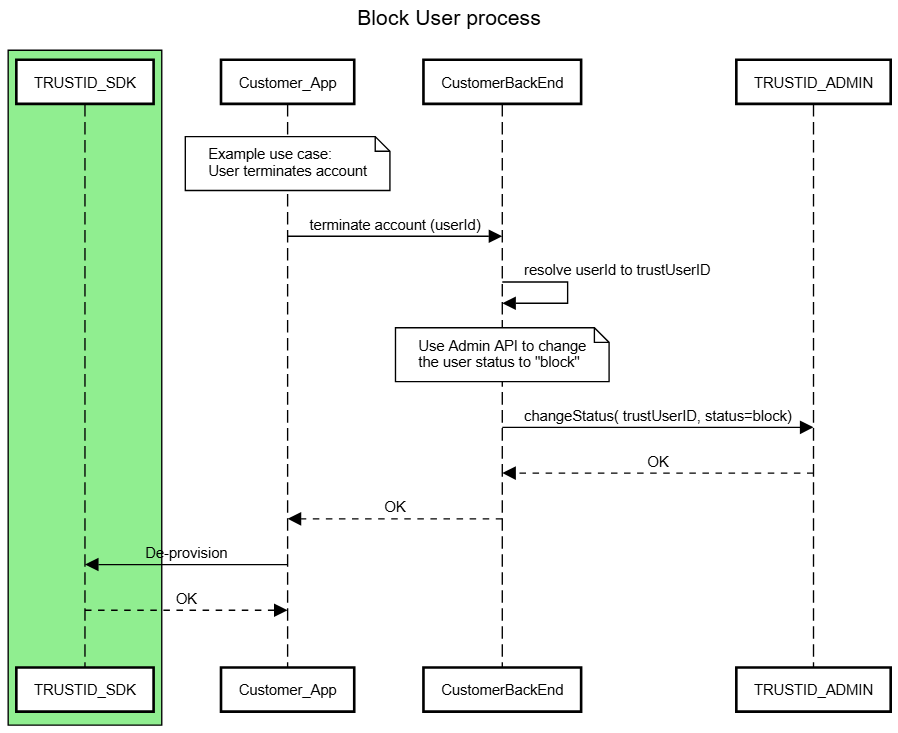
This is the process which de-activates the assigned trustUserID. It can be considered as the reverse of the provisioning process.
You could use this process when you no longer want the user to be able to use TrustID any more, for example when the user account with you is terminated or the user can be considered a security threat and needs to be deactivated.
After a user is blocked the user can not perform any more actions with TrustID.
This process is irreversible and the user needs to be provisioned again if the user is to use TrustID again (see provisioning flow higher up in this page).
To implement this flow you will need to follow the following sequence:
-
Your backend applications server needs to use the "Change User Status" Admin API and change the status of the user to "block" (see specification of this Admin API in the relevant page of this documentation).
-
Your app then needs to call the SDK de-provisioning API to erase all data from SDK. (see specification of this Admin API in the relevant page of this documentation).
It is important that the steps above are done in the above sequence, otherwise the de-provisioning SDK API will fail.