
Freja eID (SE) is a Swedish electronic identity (eID) solution that enables end users to identify themselves digitally in a secure and user-friendly manner using the Freja eID mobile application. It is a government-approved eID in Sweden and can be used for online authentication and identity verification through the E-Ident service, allowing organizations to verify users' identities with a high level of assurance. Freja eID supports secure authentication without requiring physical card readers, using the user's mobile device as the primary identification tool.
Enable Freja eID (SE) in your services
To enable Freja eID through E-Ident service, please get in touch with our support (Contact Support) or contact sales (trustservices@ingroupe.com)
Information about the end user
|
Type |
OIDC |
SAML |
Comments |
|---|---|---|---|
|
Address |
address requires scope=address |
ADDRESS |
End user’s address |
|
|
requires scope=email |
|
End user’s email |
|
Document Date of Expiry |
date_of_expiry Requires scope=openid |
DATEOFEXPIRY |
The end user's document’s date of expiry in format YYYY-MM-DD. |
|
Document Number |
document_number Requires scope=openid |
DOCUMENTNUMBER |
End user’s document number |
|
Document Issuing Country |
issuing_country Requires scope=openid |
ISSUINGCOUNTRY |
The end user's document issuing country. |
|
Document Type |
document_type Requires scope=openid |
DOCUMENTTYPE |
The end user's document type. |
|
Date Of Birth |
birthdate Requires scope=profile |
BIRTHDATE |
The end user’s date of birth in the format YYYY-MM-DD |
|
Family name |
family_name Requires scope=profile |
SURNAME |
End user's family name. |
|
Full name |
name Requires scope=profile |
FULLNAME |
End user's full name. |
|
Given name |
given_name Requires scope=profile |
GIVENNAME |
End user's first name(s). |
|
Level of Assurance |
acr |
ACR |
Accepts acr_values as urn:eident:acrp:level:high or urn:eident:acrp:level:substantial or urn:eident:acrp:level:low Always returns- urn:eident:cert:eidas:substantial or urn:eident:cert:eidas:low |
|
Phone Number |
phone_number Requires scope=phone |
PHONE_NUMBER |
End user’s phone number |
|
Registration Level |
registration_level Requires scope=profile |
REGISTRATION_LEVEL |
End user’s registration level on the Freja mobile app |
|
SSN |
ssn Requires scope=ssn |
SSN |
The end user's social security number. |
|
SSN Issuing Country |
ssn_issuing_country Requires scope=ssn |
SSN_ISSUING_COUNTRY |
Country code of the country that issued SSN |
User Experience
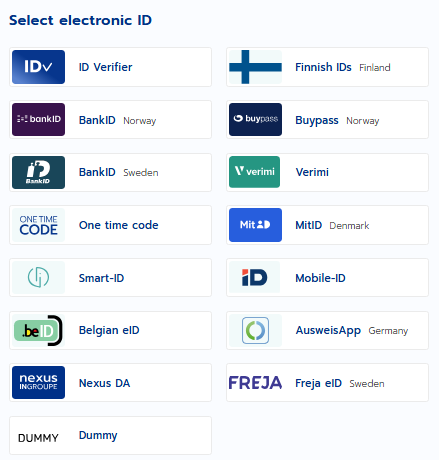
Step 1 : The IDP selection screen - The picture is an illustration of the UI in standalone and pop-up UI. User need to select an option Freja eID Sweden.
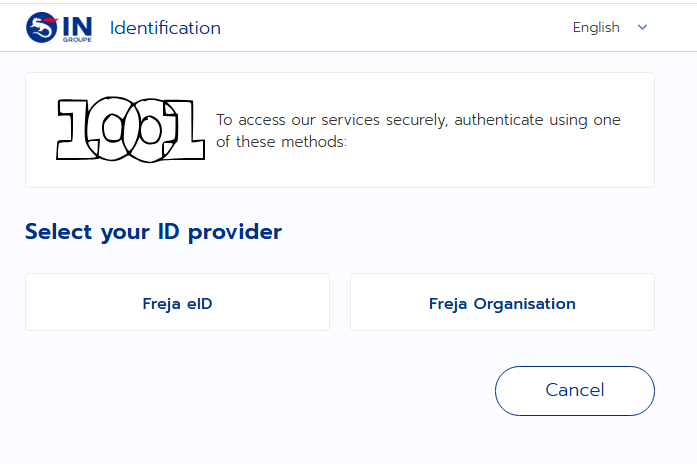
Step 2 : A Freja ID Provider selection screen - The picture is an illustration of the UI in standalone and pop-up UI. User need to select an option.
Step 3 : A QR Code – A QR code will be displayed after selecting any of the Freja option from previous selection screen.
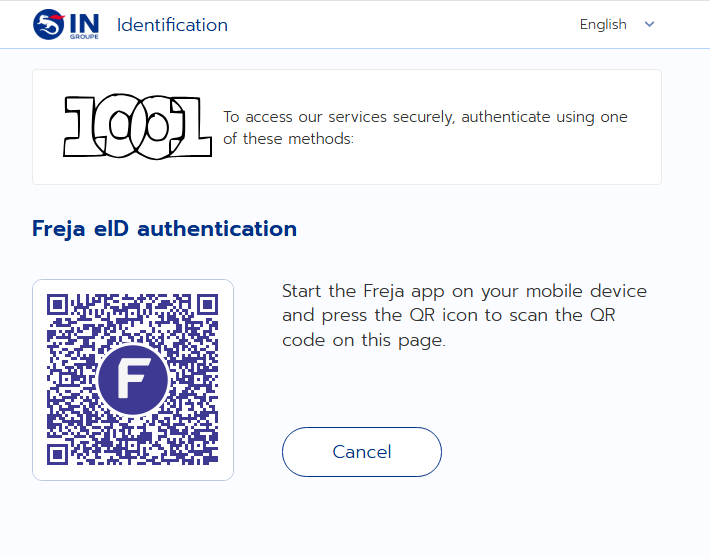
Step 4: QR Scanning using Mobile app – Open your mobile app → click on scan icon → scan the QR Code → Approve or decline the request.
Control the start of Freja
Freja is available using two types- Freja eID and Freja Organisation. To control both the types presetid/login_hint, forcepkivendor/amr_values and binding_message identification request parameters can be used.
|
Name |
Description |
Constraints |
|---|---|---|
|
presetid/login_hint |
A mandatory request parameter. The user will be presented with a choice of authorization. |
Value : See below. |
|
forcepkivendor/amr_values |
The user will be presented with a choice of authorization. |
Value : See below. |
|
binding_message |
A Base64 encoded json |
Value : See below. |
Preset ID / Login Hint
This field is a mandatory request parameter for Freja authentication. User can pass one or more IDs as described in below table separated by space-
XX – 2 letter country code, example Germany (DE)
YYYYYY – ID/Value
XG - Global, not tied to a specific country; uses XG
|
Semantic Identifier |
Format |
Description |
Example |
|---|---|---|---|
|
PNO |
PNOXX-YYYYYY |
Personal identification number or Social Security Number (SSN) |
PNOSE-1234567890 |
|
EI |
EI:XG-YYYYYY |
Context-specific entity ID, used for Organisation Identifier |
EI:XG-ingroupe |
|
EM |
EM:XG-YYYYYY |
|
EM:XG-ingroupe@ingroupe.com |
|
PH |
PH:XG-YYYYYY |
Phone Number |
PH:XG-+351234567890 |
|
IS |
IS:XG-YYYYYY |
Organisation Issuer name . It cannot be passed alone, itshould be combined with any other ID. |
IS:XG-ANY |
Forcepkivendor / AMR Values
Freja accepts below value-
se_freja
se_freja:eid
se_freja:org
To skip the selection page and jump to the QR code page, directly pass se_freja:eid or se_freja:org
Binding Message
A binding_message request parameter can be passed in SAML or OIDC. This parameters accepts Base64 encoded JSON. The JSON can have below value and format-
{
"userConfirmationMethod":"DEFAULT_AND_FACE" or “DEFAULT”
}
userConfirmationMethod defines how the user needs to confirm the authentication. Possible values for this parameter are DEFAULT and DEFAULT_AND_FACE. By default, the user confirmation method is DEFAULT, which means that the user confirms transactions by using PIN or device biometrics. Value DEFAULT_AND_FACE will request from user to perform face authentication in addition to PIN or device biometrics.