
Used by around 4 million Norwegians, BankID has become a household brand and a highly trusted digital identification service for Norwegian citizens.
Enable BankID in your services
To get you started with BankID identification through E-Ident, IN Groupe will need a merchant certificate and some configuration setting information from you. The configuration settings are supplied in the setup dialogue with support.
More information about BankID:
Merchant certificate
IN Groupe through the Signing and Identification Services are resellers of BankID merchant certificates, and this can be ordered either separately or together with E-Ident and/or E-Signing. When ordering a merchant certificate through In Groupe, you will receive an information letter asking you to complete a form with information needed to create a BankID “brukerstedsavtale” with BankID Norge. Note: In this form you need to specify if you are allowed to handle SSN.
The form shall be returned to our support and based on the form IN Groupe will register this order at BankID. After the registration you will be asked to confirm and sign the order. When the order is signed with BankID Norge, it will be sent to your bank for processing. Your bank may use up to 10 business days for processing the order. In Groupe will then receive activation information for your BankID merchant certificate from your bank. The merchant certificate will be activated and connected to your configuration.
In cases where you use another reseller, the BankID activation link and code must be sent to IN Groupe without activating it. Contact Support to get contact details of receiver of the link and code.
Test merchant certificate
In Groupe will set you up with a common test merchant certificate if nothing else have been agreed.
Test users
Test users are available here.
To get notified about BankID issues in BankID preproduction environment, subscribe to updates at this page:
Information about the end user
|
Type |
OIDC |
SAML |
Comments |
|---|---|---|---|
|
Level of assurance |
acr |
ACR |
See section below for possible values. |
|
Authentication Method |
amr |
AMR |
See section below for possible values. |
|
Birth date |
birthdate Requires scope=profile
|
DOB |
End user's date of birth. |
|
Distinguished name |
dn Requires scope=cert |
DN |
Deprecated |
|
Family name |
family_name Requires scope=profile |
SURNAME |
End user's family name. Example "Olsen". |
|
Given name |
given_name Requires scope=profile |
GIVENNAME |
End user's first name(s). Example "Ole". |
|
Personal identifier |
no_bid_pid / pid Requires scope=openid |
NO_BID_PID |
Norwegian BankID personal identifier. For the OIDC protocol, this is returned in both the no_bid_pid and pid claim. |
|
Norwegian SSN
|
no_ssn / ssn Requires scope=ssn |
NO_SSN |
The end user's social security number (no: fødselsnummer). For the OIDC protocol, this is returned in both the no_ssn and ssn claim. |
Possible AMR claim values
E-Ident returns any one of the below amr_values depending on the authentication method that was requested during identification transaction with BankID (NO).
"amr" : [ "no_bankid" ]
"amr" : [ "no_bankid", "authentication" ]
"amr" : [ "no_bankid", "customerservicecall" ]
"amr" : [ "no_bankid", "cardpayment" ]
Possible ACR claim values
Customers can request the level of assurance that is required for an identification transaction with E-Ident for BankID (NO). Depending on the level of assurance requested, any one of the following claims will be returned by E-Ident based on the actual method used for identification with BankID (NO) by the end-users.
Example:
"acr" : "urn:eident:cert:eidas:low"
"acr" : "urn:eident:cert:eidas:substantial"
"acr" : "urn:eident:cert:eidas:high"
Handling of SSN
All companies that are allowed to handle social security numbers (SSN) can get this in return after a BankID identification. For customers using the SAML protocol, SSN is returned as default, but this can be turned off by appending returnssn=false to the identification request. For customers using OIDC, SSN will only be returned if scope=ssn is set in the identification request. Read more about the optional eID specific scopes and identification request parameters for OIDC and SAML | q5 respectively.
Note: Remember to specify that you want to process SSN when ordering your BankID merchant certificate and giving IN Groupe your E-Ident configuration details.
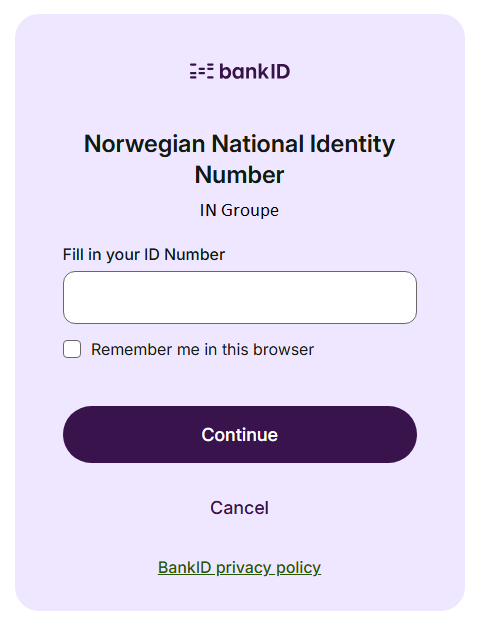
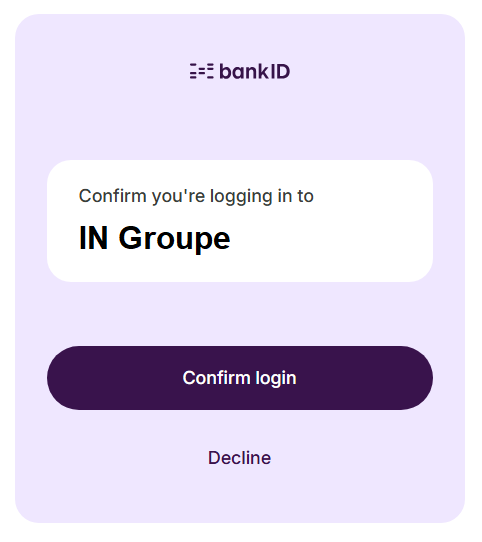
BankID with Biometric
BankID supports biometrics-based authentication, where end users can use facial recognition and/or fingerprints in the BankID app to log-in and access services online. By doing so, users will experience that the login process will go from 30 seconds to just a few seconds. The level of assurance for BankID Biometrics is defined as "substantial" whereas regular BankID (two-factor based) authentication is considered as "high".
BankID with Biometric can also be triggered by using CIBA flow (for more details see CIBA flow) and by passing no_bankid:cardpaymet as amr_values/forcepkivendor with payment information in binding_message. The no_bankid:cardpayment also supports iFrames.
login_hint
On the BankID NO authentication screen, customers can skip the 'Fill in your ID Number' page for their end-users if they know their end-user's SSN.
login_hint parameter shall be sent in the request to E-Ident with end-user's SSN, with which customers can restrict who has to identify to access their service.
|
login_hint |
The user will be presented with a choice of authorization. If the value is provided, then it will exclude other SSN than the given SSN. |
Value : [<SSN of user>] |
|---|
binding_message
User can perform biometric authentication with cardpayment approval by passing no_bankid:cardpaymet as amr_values/forcepkivendor with payment information in binding_message.
Example of binding_message for cardpayment (Recommended to use Base64 encoded JSON):
{
  "approvals": [
    {
      "subject": {
        "type": "payment",
        "amount": "100.00",
        "currency": "EUR",
        "creditorName": "Example1 Shop"
      },
      "context": {
        "referenceId": "order-123456"
      }
    },
    {
      "subject": {
        "type": "payment",
        "amount": "20.00",
        "currency": "EUR",
        "creditorName": "Example2 Shop"
      },
      "context": {
        "referenceId": "order-78901"
      }
    }
  ]
}
Below is the explanation of each field of binding_message:
1. "type" should be always "payment" for cardpayment.
2. "amount", "currency" and "creditorName" will be displayed to the user on approval screen in the mobile app.
3. "referenceId" is a unique ID of the provided card payment.
4. One or more than one payment information inside binding_message can be passed.
User experience
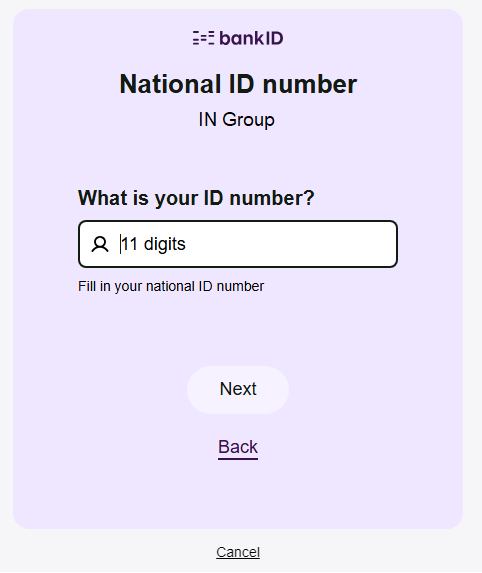
BankID authentication
The below three images shows the flow for a standard BankID authentication. Step 2 may differ depending on the authentication methods available for the user.
Step 1 (enter SSN):
Step 2 (enter OTP):
.png?cb=2cbb41b396b4c03a9b4931bf9103c1f4)
Step 3 (enter password):
.png?cb=a2c3a90498e7526f0c5830504e6c79ec)
BankID with Biometric authentication
BankID with Biometric is triggered by setting acr_values to "urn:bankid:bis". Dialogs are displayed with white background.
Step 1 (enter SSN):
Step 2 (Biometric):
For more information about BankID with Biometric user experience, see official BankID pages at BankID with biometrics
Error codes
BankID specific error codes can be found in BankID documentation at https://bidbax.atlassian.net/wiki/spaces/BIDMERCH/pages/486900069/BankID+Error+Codes
BankID logo
If needed, the BankID logo can be downloaded from Presse (bankid.no).