UI Updates to BankID Sweden identification in E-Ident
What is the change?
At E-Ident, we have made few changes to the UI for identification with BankID SE. The change is:
-
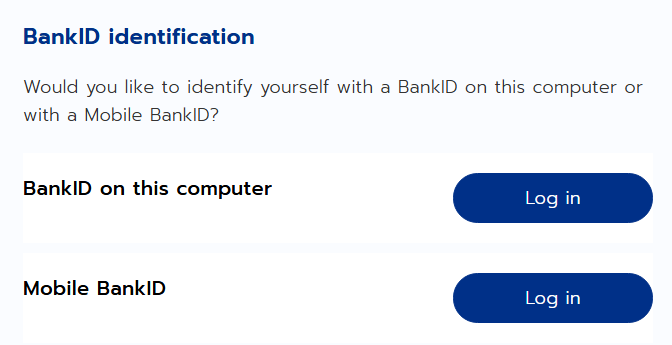
We have removed the device selection choice for end users to choose between BankID on this device or Mobile BankID.
-
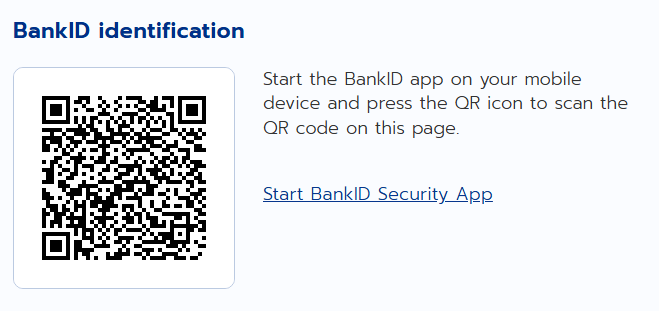
QR code display page is shown directly to end users after they choose BankID SE from eID selection screen or if BankID SE is the only method available for users to identify.
-
Users who wish to identify through BankID on another device can scan the QR code through BankID Security app from the device they wish to identify themselves.
-
If users would like to identify through BankID Security app on the same device, then there is a link on the same page where QR code is displayed, to continue identifying with the BankID Security app on the same device.
What does this means to customers?
Customers can expect an easier way for their end-users to identify themselves with BankID SE
If you are using custom css with us, you may need to make a few changes on your end. Please reach out to our customer success team if you need any help in this regard.
UI update examples
Before the change:
After the change:
Planned date for pre-production: 29-May-2026
Planned date for production: 01-July-2026
Need help/Have questions:
Please reach out to https://ingroupe.com/in-trust-services-support-contact-page/